

News
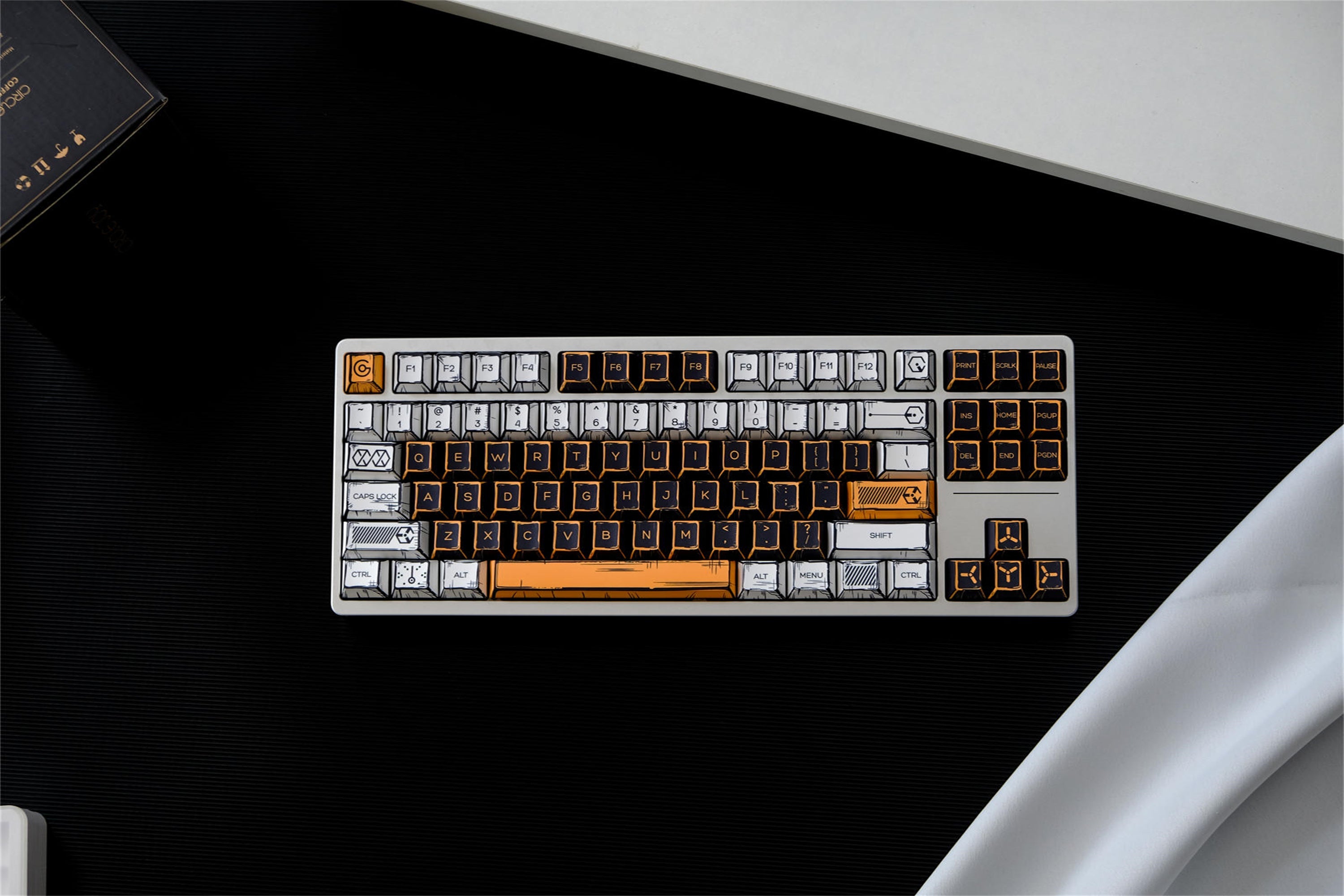

Cyberpunk 2077 Comic Style Keycaps Loved by Fans Everywhere
You can quickly make your keyboard better with the Cyberpunk 2077 Comic Style Keycaps from joorkey. These CHERRY PROFILE KEYCAPS use strong materials. This makes them last long and feel nice every day. The bright comic design looks cool on any desk. It brings the world of Cyberpunk 2077 to your hands. Many fans and keyboard lovers like these keycaps for their look and how well they work. Key Takeaways Cyberpunk 2077 Comic Style Keycaps make your keyboard look cool. They use bright colors and strong materials. PBT material makes the keycaps last a long time. It stops them from getting worn out, dirty, or smudged. Your keyboard stays clean and new. Dye-sublimation keeps the colors bright and the pictures clear. Your keycaps look good even if you use them a lot. The Cherry profile shape is comfy for typing and gaming. It helps your fingers not get tired. You can type faster and play better. There are 146 keys in the set. These keycaps fit many keyboard types. You can change your keyboard to match your style. Technical Superiority High-Quality PBT Material If you want your keyboard to last, these keycaps are a good choice. Cyberpunk 2077 Comic Style Keycaps use PBT material. This plastic is strong and feels nice to touch. The keycaps are 1.7 mm thick. They feel solid when you type on them. The anti-grease coating helps keep them clean. You do not have to worry about fingerprints or smudges. These keycaps do not let water or dust in. You can wipe them with a soft cloth to clean them. The design helps your keyboard look new for a long time. You get a great typing experience every day. PBT material makes the keycaps last longer. Anti-grease coating keeps them looking clean. Waterproof and dustproof features make cleaning easy. Tip: Wipe your keycaps gently to keep the colors bright and the surface smooth. Advanced Dye-Sub Technology The colors on these keycaps stand out right away. Cyberpunk 2077 Comic Style Keycaps use dye-sublimation technology. The pictures and words stay bright for years. The five-sided thermal sublimation puts the colors deep in the plastic. The colors do not fade, even if you use them a lot. The comic designs look sharp and clear. Your keyboard looks cool and keeps its style. Five-sided thermal sublimation keeps the legends bright. Colors stay strong for a long time. Graphics look bold and clear. Ergonomic Cherry Profile Typing and gaming feel better with these keycaps. The Cherry profile shape fits your fingers well. You do not get tired as fast when you use them. The keycaps are lower, so your fingers move easily. You get a steady and wobble-free feel. You can type faster and play games better. Ergonomic Benefit Description Relieves fatigue Cherry keycaps are lower, so you do not stretch your fingers as much. This makes typing more comfortable. Stability during gaming sessions They do not wobble, so you press keys with more confidence and accuracy. Faster response and speed The keys are closer together, so you can type faster. This helps in fast games. Typing feels smooth and fun. Cyberpunk 2077 Comic Style Keycaps give you comfort, style, and strength. Your keyboard will look and feel awesome. Cyberpunk 2077 Comic Style Keycaps Design Vibrant Comic Aesthetics You will notice the bold comic style as soon as you see these keycaps. The designs use sharp lines and bright colors. This style brings the world of Cyberpunk 2077 to your desk. You get a look that feels fresh and exciting. The comic-inspired art makes your keyboard stand out. You can show your love for the game every time you type or play. Tip: A colorful keyboard can make your workspace more fun and creative. Iconic Graphics and Colors The Cyberpunk 2077 Comic Style Keycaps use graphics that fans will recognize right away. You see symbols, logos, and patterns from the game. The colors are not dull or faded. They use strong blues, yellows, and pinks. These colors match the Cyberpunk 2077 theme. The dye-sublimation process keeps the colors bright for a long time. You do not have to worry about the designs wearing off. Every key looks sharp and clear, even after many hours of use. Customization Options You get 146 keys in this set. This means you can fit many different keyboard layouts. You can use these keycaps for compact or full-size keyboards. Here is a table that shows the layouts you can use: Supported Layouts Description 40% Compact layout for minimalists 60% Popular compact layout 65% Slightly larger than 60% 70% Intermediate size 80% Tenkeyless layout 100% Full-size layout Specific Models Wooting 60HE, Keychron K2, NuPhy Air 75 You can mix and match the keys to create your own style. The Cyberpunk 2077 Comic Style Keycaps let you express yourself. You can build a setup that is unique to you. Many fans enjoy making their keyboard look special. You can do the same with this set. Fan Appeal Community Feedback Fans talk about these keycaps online a lot. They post pictures of their keyboards with the comic style. People say the colors are bright and the designs are cool. Some users say their friends ask about the keycaps when they see them. The keyboard community is excited about these keycaps. Many people like to show off their Cyberpunk layouts. More fans join in and share their thoughts. Note: Fans say these keycaps help them feel closer to the Cyberpunk 2077 world. Compatibility and Practicality You want keycaps that fit your keyboard well. Cyberpunk 2077 Comic Style Keycaps work with most mechanical keyboards that use MX switches. You can use them for layouts with 61 to 108 keys. Popular models like Wooting 60HE, Keychron K2, and NuPhy Air 75 support these keycaps. The table below shows how they compare with other sets: Product Name Compatibility Price Cyberpunk Comic Style Cherry PBT Keycaps Cherry MX switches $30.88 JOMKIZ PBT Keycaps Various mechanical and optical keyboards N/A Custom Cyberpunk Keycaps Set Most mechanical layouts N/A YMDK Black White Comic Keycaps MX mechanical keyboards N/A Some keyboards do not work with these keycaps. Razer, Corsair, and Logitech models may have different shapes. Their stabilizers and switches are not the same as MX types. You should check your keyboard before you buy. Razer keycaps use special stabilizers. Corsair layouts may not fit all keys. Logitech keyboards need MX type switches for compatibility. Collectibility These keycaps cost less than many other themed sets. The set sells for $30.88. Fans like that shipping is fast and ordering is easy. You can get your set quickly and start using it. Many collectors want these keycaps because they are about the Cyberpunk 2077 game. You can add them to your collection or give them as a gift. The bright comic style and game graphics make them popular with keyboard fans. Tip: Collecting themed keycaps lets you change your setup and show your personality. Comparison with Other Keycaps Technical Advantages When you look at keycaps, you want them to last and feel good every time you type. Cyberpunk 2077 Comic Style Keycaps use thick PBT material. Standard keycaps often use ABS plastic, which wears out faster. PBT keycaps resist shine and keep their texture longer. You will notice the difference when you touch them. The anti-grease coating helps you keep your keyboard clean. You do not have to worry about fingerprints or smudges. Here is a table that shows how Cyberpunk 2077 Comic Style Keycaps compare with regular ABS keycaps: Feature Cyberpunk 2077 Comic Style Standard ABS Keycaps Material PBT (1.7mm thick) ABS (thin) Durability High Medium Anti-Grease Coating Yes No Waterproof/Dustproof Yes No Color Longevity Excellent Fades over time Tip: If you want your keyboard to look new for years, choose PBT keycaps. Design and User Satisfaction You want your keyboard to show your style. Cyberpunk 2077 Comic Style Keycaps use bright colors and comic graphics. Standard keycaps often look plain and simple. You get 146 keys in this set, so you can fit many layouts. You can mix and match keys to create your own look. Fans say these keycaps make their keyboards stand out. You can see the difference when you compare them side by side. The Cherry profile shape feels comfortable for long typing or gaming sessions. You get a smooth and steady feel with every press. Cyberpunk 2077 Comic Style Keycaps let you express your love for the game. You get more choices for layouts and colors. The design helps you enjoy your keyboard every day. Note: Many users say these keycaps make typing and gaming more fun. If you want a keyboard that looks cool and feels great, Cyberpunk 2077 Comic Style Keycaps give you both. You get technical strength and bold design in one package. You can make your keyboard look cool with Cyberpunk 2077 Comic Style Keycaps. These keycaps are easy to use and fit many keyboards. The table below shows why people like them: Feature Benefit Wide Compatibility Works with lots of keyboard layouts Durable & Sweat-Resistant Stays nice and clean for a long time Customizable Design You can pick your favorite style You can change your keyboard to match what you like. You will feel comfortable using it every day. What style would you pick for your keyboard? FAQ What keyboards do Cyberpunk 2077 Comic Style Keycaps fit? You can use these keycaps with most mechanical keyboards that have MX switches. They work with layouts from 61 to 108 keys. They do not fit Razer, Corsair, or Logitech keyboards. How do you clean the keycaps? Wipe the keycaps gently with a soft, damp cloth. The waterproof and dustproof design makes cleaning easy. Avoid using harsh chemicals to keep the colors bright. Are the designs on the keycaps durable? Yes, the dye-sublimation process puts the colors deep into the PBT plastic. You get bright graphics that do not fade or wear off, even after long use. Can you customize your keyboard layout with this set? You get 146 keys in the set. You can mix and match keys to fit many layouts, like 60%, 65%, or full-size keyboards. This lets you create a unique look.
Learn more
Pokémon joorkey keycaps surprise the custom scene
You might have noticed a new trend in the custom keyboard world. Pokémon joorkey keycaps have caught the attention of many enthusiasts like you. These keycaps stand out with their playful designs and high-quality build. When you add Pokémon Keycaps to your setup, you show off both your love for the game and your style. The joorkey brand brings a fresh wave of excitement, sparking curiosity and buzz across the community. Key Takeaways Pokémon joorkey keycaps make your keyboard look cool. They have fun designs and use strong materials. These keycaps fit many keyboard types. They work with Cherry MX switches, so many people can use them. The PBT DYE-SUB material makes them last a long time. The colors stay bright and do not fade. Collectors like the special designs and small amount made. This makes the keycaps wanted by many people. People in the community say they like how the keycaps fit. They also like how they look. This makes more fans want to try them too. Pokémon joorkey keycaps overview Design and features Pokémon joorkey keycaps make your keyboard look fun. The set has 151 keys, so you can use many layouts. The price is $33.88, so most people can buy them. Each keycap has a Cherry profile. This makes typing feel easy and normal. The shape helps your fingers find keys fast. The keycaps are made with PBT DYE-SUB material. This keeps the colors bright for a long time. The anti-grease layer stops your keycaps from getting dirty. You will not see fingerprints or smudges. The keycaps are waterproof and dustproof. If you spill something, you can clean it fast. Dust will not hurt your keyboard. The shape fits your fingers well. You can type or play games for hours and stay comfortable. Tip: Pokémon joorkey keycaps give your keyboard style and last a long time. Compatibility and materials You need to check your keyboard’s switches before buying. These keycaps fit Cherry MX switches and other MX-style stems. You can use them on many layouts, like 61, 64, 68, 71, 75, 84, 87, 96, 98, 104, and 108 keys. If your keyboard uses special switches, like Razer or Logitech, these keycaps will not work. Here is a table that shows how materials change your typing: Material Texture Durability User Experience ABS Smooth, gets shiny over time Wears out faster Bright colors, good for RGB lights PBT Matte, a little rough Very strong, does not fade Keeps texture, loved by fans PC Clear or partly clear, smooth Strong and bends Good for RGB, softer sound Pokémon joorkey keycaps use PBT. This means they have a matte look and last a long time. The letters will not fade because of dye-sublimation. You will hear a nice sound when you type and feel comfortable every day. Surprising the custom scene Popularity boost You may have noticed how fast Pokémon joorkey keycaps have become popular. Many keyboard fans talk about them online. People share photos of their new keycaps on social media. You see these keycaps in many keyboard setups. The bright colors and Pokémon designs catch your eye right away. Many users say they want to collect every set. This excitement has helped Pokémon joorkey keycaps stand out in the custom keyboard world. Design innovation Pokémon joorkey keycaps bring something new to your desk. The designs use classic Pokémon themes with modern style. Each keycap shows careful attention to detail. The colors stay bright because of the PBT DYE-SUB material. You get a smooth feel and a strong keycap. The ergonomic shape helps your fingers rest easily. You can type or play games for a long time without feeling tired. These keycaps also resist grease and dust, so your keyboard looks clean and fresh. The mix of fun design and smart features makes these keycaps special. Community response You can find many positive comments about Pokémon joorkey keycaps in forums and reviews. Here are some things people say: Absolutely stunning and well made. LOVE IT!!!! Exactly as described and fit on my keyboard perfectly, worth the cost and wait to ship from the US :) I love these keys! I had no problem attaching them to my Alienware keyboard. Highly recommended for Pokémon fans! Super cute and colors really pop out better with them Many users feel happy with their purchase. They say the keycaps fit well and look amazing. Some people even recommend them to other Pokémon fans. The community has welcomed these keycaps with open arms. You see more people joining the trend every day. Industry impact Trend influence You can see how Pokémon joorkey keycaps have changed the way people look at custom keyboards. Many fans now treat their keyboards like collectible art. You might notice that each keycap often shows a 3D Pokémon inside clear resin. This style lets you show off your favorite characters and makes your keyboard unique. The design looks like the packaging of classic toys, which brings back memories for many collectors. These trends have inspired other brands to try new ideas and add more personality to their products. Keyboards become art pieces, not just tools. 3D Pokémon figures inside keycaps add a personal touch. Toy-inspired packaging attracts both fans and collectors. Collaborations You may spot more brands working together because of the buzz around these keycaps. Companies now look for ways to team up with artists and pop culture brands. Some keyboard makers have started to release special sets with famous characters. These partnerships help brands reach new fans and create limited-edition products. You get more choices and can find keycaps that match your favorite games or shows. Note: Collaborations often lead to rare and exclusive keycap sets. You might want to keep an eye out for new releases. Market demand The demand for Pokémon joorkey keycaps keeps growing. Many people want to add them to their collections. Stores often sell out quickly when new sets arrive. You might see prices rise as more fans join the hobby. The market now pays more attention to design and quality. Brands work harder to make keycaps that stand out. You benefit from better choices and more creative options for your keyboard. Enthusiast appeal Collector interest You might notice that collectors love Pokémon joorkey keycaps. These keycaps turn your keyboard into a display piece. Many fans want to own every design. Some people even keep their keycaps in special cases. You can join online groups where collectors trade and show off their sets. The limited stock and unique Pokémon themes make each set feel special. If you enjoy collecting, these keycaps give you a fun way to combine your hobby with your daily tech. Tip: Keep your keycaps in a dust-free box to protect their colors and details. Customization Pokémon joorkey keycaps let you change the look of your keyboard. You can pick your favorite Pokémon or mix different designs. The set fits many layouts, so you can use them on most keyboards with Cherry MX switches. You get to choose how your keyboard looks and feels. Some users swap keycaps for special events or seasons. This makes your setup feel fresh and personal. You can match your keycaps with your desk or gaming gear. Try different layouts for a new typing feel. Mix and match keycaps for a custom look. Change keycaps for holidays or special days. User experiences Many users say these keycaps feel great for long typing sessions. The ergonomic design helps your fingers stay comfortable. You will notice less strain, even after hours of use. The PBT material keeps the surface smooth and clean. People share stories about how their keyboards look better and feel better. Some users say their friends ask about their new keycaps. You can enjoy both style and comfort every day. Feature Benefit Ergonomic shape Less finger fatigue PBT material Durable and easy to clean Fun designs Makes typing enjoyable Pokémon joorkey keycaps bring joy to your desk and help you type with ease. Challenges and criticisms Quality concerns You might wonder if Pokémon joorkey keycaps are good quality. Many people like the bright colors and strong feel. Some users talk about small changes in print or texture between sets. People sometimes argue online about what makes a keycap feel special. Some compare these keycaps to artisan keycaps, which are handmade and use special materials. These talks help you know what to expect before you buy. Note: Most buyers say the keycaps last long and keep their color, but you should read reviews for the newest opinions. Pricing and access Pokémon joorkey keycaps can cost very little or a lot. Some sets are only $12.41, but others cost up to $155.99. The price changes because of the design, material, and how rare the set is. You can see how Pokémon joorkey keycaps compare to other sets in this table: Keycap Set Price Range Pokémon Keycaps $12.41 - $155.99 Mewtwo Mew Keycaps Set $114.61 (sale) Jigglypuff V2 Keycaps Set $103.84 (sale) Mewtwo Artisan Keycap $59.16 (sale) Gengar Artisan Keycap $57.56 (sale) You might see that many things change the price: How hard the design is to make What material is used, like PBT or ABS How well known the brand is If the keycap is rare or special Some fans talk about if the high price is worth it for rare sets. You should think about what is most important to you—how it looks, how it feels, or if it is rare. Compatibility issues Pokémon joorkey keycaps fit most keyboards with Cherry MX switches. But you may have problems if you use Razer or Corsair keyboards. Some people say the keycaps do not fit well on these brands, especially big keys like the spacebar or shift. You might need to change your keyboard or pick a different set if you use these brands. Razer keyboards often use different stabilizers. Cherry-style PBT keycaps may not fit Razer’s Huntsman Mini unless you change something. Tip: Always check if your keyboard works with new keycaps before you buy. This helps you avoid problems and makes sure they fit right. You can see Pokémon joorkey keycaps change the keycap world. These keycaps help start new trends and make people more creative. Many fans now think of their keyboards as art. More brands try fun designs and work together. The hobby gets bigger as more people join in. You will see even cooler keycaps and ideas soon. Keep looking for the next big thing in keyboard style. FAQ Can you use Pokémon joorkey keycaps on any keyboard? You can use these keycaps on most keyboards with Cherry MX switches. They do not fit Razer, Corsair, Logitech, or Steelseries keyboards. Always check your keyboard type before you buy. How do you clean Pokémon joorkey keycaps? You can remove the keycaps and wash them with warm water and mild soap. Dry them with a soft cloth. The waterproof and dustproof design helps keep them clean longer. What layouts do Pokémon joorkey keycaps support? You get 151 keycaps in one set. These fit many layouts, like 61, 64, 68, 71, 75, 84, 87, 96, 98, 104, and 108 keys. You can use them for most custom builds. Do Pokémon joorkey keycaps fade or wear out quickly? You get keycaps made from PBT DYE-SUB material. This keeps colors bright and resists wear. The anti-grease coating helps prevent fading and keeps your keycaps looking new.
Learn more
Yasuo Swordsman Keycaps Inspired by Anime Legends
If you like anime and want a cool keyboard, Yasuo Swordsman Keycaps are a good choice. These keycaps from joorkey add strong anime style to your desk. They are also comfy and last a long time. You get the look of your favorite legends. You also get the feel of CHERRY PROFILE KEYCAPS for a good price. See how they match up with other anime keycap sets below! Key Takeaways Yasuo Swordsman Keycaps have strong anime designs. They make your keyboard look like it honors your favorite characters. These keycaps use tough PBT material. They do not get shiny and keep their bright colors for a long time. This means they stay good for years. The keycaps work with most mechanical keyboards. They fit Cherry MX-style switches, so many people can use them. Some keycaps come out in limited edition sets. Special collaborations give cool designs. Collectors and fans like these because they are rare. Clean your keycaps often to keep them nice. Do not eat near your keyboard to help them stay fresh. Yasuo Swordsman Keycaps Features Anime Design Elements When you look at Yasuo Swordsman Keycaps, you see anime inspiration right away. The legends and symbols on each key come straight from the world of anime. You get bold lines, sharp colors, and designs that remind you of your favorite swordsman heroes. These keycaps turn your keyboard into a tribute to anime legends. The artwork on each key stands out. You can spot the unique style even from across the room. The color palette uses deep blues, crisp whites, and striking reds. These colors match the energy and drama of anime battles. Every detail, from the sword motifs to the stylized fonts, helps your keyboard tell a story. Tip: If you love anime, these keycaps let you show off your passion every time you type or game. Material and Durability You want your keycaps to last, and Yasuo Swordsman Keycaps deliver. They use high-quality PBT material, which feels solid and resists shine. The DYE-SUB printing process keeps the legends bright and clear, even after years of use. Each keycap has a 1.7 mm thickness, so you get a sturdy feel with every press. Cherry profile height gives you an ergonomic typing angle. Your fingers rest comfortably, and you can type or play for hours without strain. The non-slip surface means your fingers stay in control, even during fast-paced gaming. Waterproof and dustproof features make cleaning easy. You do not have to worry about spills or dust ruining your setup. Injection molding technology ensures each keycap has a smooth finish and perfect fit. Based on user reports and manufacturer data, Yasuo Swordsman Keycaps made from PBT can last anywhere from 5 to over 10 years. That means you get a keyboard upgrade that keeps looking and feeling great for a long time. Note: These keycaps fit most mechanical keyboards that use Cherry MX or similar switches. You get both style and peace of mind knowing your keys will stand up to daily use. Trends in Yasuo Swordsman Keycaps Popular Styles and Colors You see a lot of choices when you look at Yasuo Swordsman Keycaps. Fans love the bold colors and sharp designs. Deep blue, crisp white, and bright red are the most popular. These colors remind you of anime battles and heroes. Some sets mix in gold or silver for a special touch. You can pick a style that matches your desk or your favorite anime character. Collectors like sets with unique sword patterns or dramatic fonts. Some people want a simple look, while others go for keys with lots of detail. You might see keyboards with a full anime scene across the keys. Others just use a few special keys to show off their style. Here’s a quick look at what’s trending: Style Color Palette Collector Appeal Swordsman Motif Blue, White, Red High Minimalist White, Silver Medium Anime Scene Mixed Colors High Tip: Try mixing and matching colors to make your keyboard stand out. You can swap a few keys or change the whole set. Limited Editions and Collaborations You get even more choices with limited edition releases. These special keycaps often feature new designs or rare colors. Collectors watch for new drops and anime partnerships. Some sets sell out fast, so you need to act quickly. One standout is the Chibi Version Serious Yasuo Keycap. This keycap shows Yasuo’s serious face, wild hair, and wind-themed armor. It uses high-quality resin and fits Cherry MX switches. You get fine details like facial markings and armor accents. The price is $23.50, and shipping takes about 8-15 working days. Fans say it’s a must-have for any anime keyboard setup. You also see collaborations with anime franchises. These sets might include special artwork or exclusive colors. People love collecting these because they feel unique and personal. Note: Limited editions and collaborations make your keyboard feel one-of-a-kind. If you want something rare, watch for new releases and partnerships. Choosing Yasuo Swordsman Keycaps Keyboard Compatibility You want your new keycaps to fit your keyboard perfectly. Yasuo Swordsman Keycaps work with most mechanical keyboards that use MX-style switches. These switches are very common. You will find them in many popular brands. If your keyboard uses Cherry MX or similar switches, you are in luck. Here is a quick look at compatibility: Keycap Set Compatibility Notes Yasuo Swordsman Keycaps Mechanical keyboards with MX style switches Compatible with major brands like Ducky, Keychron, etc. You can use these keycaps on layouts from 61 keys all the way up to 108 keys. That means you can upgrade a compact 60% board, a tenkeyless, or a full-size keyboard. Just check your keyboard’s specs before you buy. Some keyboards do not work with these keycaps. Brands like Razer, Corsair, Logitech, and Steelseries often use special switches or stabilizers. These can make it hard to swap keycaps. For example, the Razer Huntsman TE does not support third-party keycaps at all. Here is a table to help you see which brands might have issues: Keycap Type Compatibility Notes Razer PBT Keycaps Fits smaller keys Stabilizers may cause issues Third-party Keycaps Not compatible (Razer Huntsman TE) No replacement keycaps available Tip: Always check your keyboard’s switch type and layout before you order new keycaps. This saves you time and money. Setup Matching Tips You want your keyboard to look and feel just right. Here are some easy steps to help you match Yasuo Swordsman Keycaps to your setup and style: Check your keyboard layout. Is it 60%, TKL, or full-size? Make sure you have the right number of keys. Think about the material. PBT feels solid and lasts a long time. Pick a profile you like. Cherry profile is lower and more ergonomic. Some people like SA for a tall, retro look. Others prefer DSA or XDA for flat, even rows. Decide if you want your RGB lights to shine through. Some keycaps let more light through than others. Set a budget. You do not need to spend a lot to get a great look. You can also mix and match colors. Try swapping just a few keys for a pop of color. Or go all out and change the whole set. The choice is yours. Here is a quick guide to keycap profiles: OEM: Safe and familiar Cherry: Lower and more ergonomic SA: Tall and retro DSA/XDA: Flat and uniform Note: Your keyboard is your canvas. Have fun and make it your own! Community and Buying Insights User Feedback You might wonder what other fans think about these keycaps. Many users say Yasuo Swordsman Keycaps feel great for both gaming and typing. The Cherry profile helps your fingers move fast and stay comfortable. People love the bold anime designs. Some collectors show off their keyboards online and get lots of likes. They say the colors stay bright, even after months of use. You can find photos and reviews on keyboard forums and social media. Fans often mention how easy it is to clean the keycaps. They also like how the set fits many keyboard sizes. Tip: If you want to join the community, share your setup on Reddit or Discord. You can get advice and see how others use their keycaps. Where to Buy You want to make sure you get real Yasuo Swordsman Keycaps. Many trusted sites sell authentic sets. Here are some places you can check: Joorkey: This site offers many anime-themed keycaps. You can find options that match your favorite characters. Note: Always buy from trusted shops and check for these signs. This helps you get the best quality for your keyboard. Yasuo Swordsman Keycaps bring anime legends to your keyboard with bold style and lasting quality. Here’s a quick look at what makes them special: Feature Details Design Yasuo-inspired, wind-swept hair, katana motifs Material Durable resin Compatibility Fits most Cherry MX-style keyboards Key Size Standard 1U Height Fit Works with R1-R4 rows for comfy typing To keep your keycaps looking fresh, try these tips: Brush off dust daily. Wipe with a damp cloth for smudges. Avoid snacks near your keyboard. Wash your hands before typing. Deep clean by soaking and air drying. Show off your setup! Share your Yasuo Swordsman Keycaps photos or stories in the comments. Your keyboard could inspire someone else. 🎮✨ FAQ How do I clean my Yasuo Swordsman Keycaps? You can remove the keycaps and use a soft brush or damp cloth. Let them air dry before putting them back. This keeps your keyboard looking fresh. Will these keycaps fit my keyboard? If your keyboard uses Cherry MX or similar switches, you can use Yasuo Swordsman Keycaps. They fit most layouts from 61 to 108 keys. Are the legends on the keycaps durable? Yes! The legends use DYE-SUB printing. This means the designs stay bright and clear, even after lots of typing or gaming. Can I use these keycaps for gaming? Absolutely! The Cherry profile and non-slip surface help your fingers move fast. Many gamers love the comfort and style. Do Yasuo Swordsman Keycaps support RGB lighting? These keycaps do not let light shine through the legends, but you can still enjoy your keyboard’s underglow and side lighting.
Learn more
EVA-01 Side Light Keycaps Technical Specs Explained Simply
You want your keyboard to stand out and feel great to use. The EVA-01 Side Light Keycaps give you bold style, strong PBT material, and smooth comfort. Side lighting adds a cool glow. These keycaps fit many layouts, so you get a custom look that works with your setup. Key Takeaways EVA-01 Side Light Keycaps have a special look from anime. They make your keyboard look different and cool. They also help your hands feel good when you type for a long time. These keycaps use strong PBT material. This means they do not get damaged easily. They keep looking nice and are simple to clean. The side lighting makes your keyboard look even better. It gives a bright glow that looks best with RGB backlighting. This is great for gamers and people who love keyboards. EVA-01 Side Light Keycaps Overview Design and Purpose You want your keyboard to look unique and feel great every time you type. EVA-01 Side Light Keycaps take inspiration from the bold colors and futuristic style of the EVA-01 mecha. If you love anime or just want something different, these keycaps bring a fresh vibe to your desk. The set targets keyboard fans who care about both looks and performance. You get a set that fits many mechanical keyboards, so you can show off your style whether you’re gaming or working. Here’s a quick look at what makes these keycaps stand out: Feature Description Material High-quality, thick PBT material (about 1.6mm thick) Profile Cherry profile design, taller and shaped for comfort Compatibility Works with 40%, 60%, 65%, 70%, 80%, and full-size layouts Ideal Use Perfect for Wooting 60HE and other mechanical keyboards Key Features You get a full set with 128 keys, so you can cover almost any layout you want. EVA-01 Side Light Keycaps offer a side lighting effect that adds a cool glow to your keyboard. The price is easy on your wallet, too. Compared to other Evangelion-themed sets, you save a lot: Product Price (USD) EVA-01 Side Light Keycaps $28.88 Other Evangelion Keycap Sets $84.96 You don’t have to worry about fit. These keycaps work with most Cherry MX mechanical keyboards. You get style, comfort, and value all in one package. Technical Specs PBT Material and Dye-Sublimation You want keycaps that last and look sharp. EVA-01 Side Light Keycaps use PBT, which is a tough plastic. PBT resists wear, so your keycaps won’t get shiny or fade after lots of use. The legends on each key use dye-sublimation. This means the letters and symbols are baked into the plastic, not just printed on top. You can type every day, and the legends stay clear and bright. Tip: If you spill something or your hands get sweaty, PBT keycaps are easy to clean. You just wipe them off, and they look new again. Side Lighting Effect Want your keyboard to glow? These keycaps have a special side lighting design. Light from your keyboard’s LEDs shines through the sides of each keycap. This creates a cool halo effect around your keys. The glow makes your setup look futuristic, especially in a dark room. You don’t just get light from the top—you get a full, colorful experience every time you type or game. The side lighting works best with keyboards that have RGB backlighting. You can choose different colors and effects to match your style. The glow is soft, so it won’t hurt your eyes. Keycap Thickness and Profile Thickness matters for how your keyboard feels. EVA-01 Side Light Keycaps have a thickness of about 1.6mm. This makes them sturdy and gives each key a solid feel when you press it. The Cherry profile design means the keys are shaped to fit your fingers. They’re taller than XDA keycaps, so your hands rest naturally on the keyboard. Here’s a quick look at how the thickness compares: Keycap Profile Thickness Description EVA-01 1.6mm Durable, Cherry profile, ergonomic shape The Cherry profile helps you type comfortably. You can use your keyboard for hours, and your fingers won’t get tired. The shape supports your hands, making every keystroke smooth. Waterproof and Anti-Grease You don’t want sticky or dirty keys. EVA-01 Side Light Keycaps have a waterproof and anti-grease coating. If you spill a drink or eat snacks while gaming, you can clean the keycaps easily. The coating keeps fingerprints and oil away, so your keyboard always looks fresh. Note: These features make the keycaps perfect for busy desks and long gaming sessions. You spend less time cleaning and more time enjoying your keyboard. You get style, comfort, and durability all in one package. EVA-01 Side Light Keycaps are built for users who want their keyboard to look great and work well every day. Compatibility Supported Layouts You want your keyboard to fit your style and needs. EVA-01 Side Light Keycaps work with many popular layouts. You can use them on compact boards or full-size setups. Here’s a quick look at the supported layouts: Layout Type Key Count 60% 61, 64, 68 75% 71, 75, 84 TKL 87 96% 96, 98 Full-size 104, 108 You get 128 keys in the set, so you have plenty of options. You can swap out keys for your favorite layout and make your keyboard truly yours. Switch Types You want your keycaps to feel great every time you type. EVA-01 Side Light Keycaps fit mechanical keyboards that use Cherry MX switches and similar styles. If your keyboard uses Cherry MX, Gateron, Kailh, or Outemu switches, you’re good to go. The keycaps snap on easily and stay secure. You get a smooth typing experience with every press. Tip: Always check your switch type before you buy new keycaps. This helps you avoid surprises and makes installation easy. Brand Exclusions Some keyboards use special designs. EVA-01 Side Light Keycaps do not fit Razer, Corsair, Logitech, Steelseries, or Gigabyte keyboards. These brands use different stems or layouts. You get a standalone keycap set, so you only need a compatible mechanical keyboard. If you use a Cherry MX-style board, you’re set. You can upgrade your keyboard and enjoy a fresh look. EVA-01 Side Light Keycaps make your setup stand out and work with most popular layouts and switches. User Benefits Enhanced Typing Comfort You want your keyboard to feel good every time you use it. The Cherry profile shape of these keycaps fits your fingers well. You get a smooth and natural typing experience. The keys have just the right height and curve, so your hands stay relaxed. You can type or game for hours without feeling tired. The solid PBT material gives each key a sturdy feel. Every press feels satisfying and steady. Tip: If you spend a lot of time at your keyboard, comfort matters. These keycaps help you enjoy every moment. Durability and Easy Maintenance You want your keycaps to last and look great. The EVA-01 Side Light Keycaps use strong PBT plastic. This material resists wear, so the keys do not get shiny or fade. The anti-grease coating keeps fingerprints and smudges away. Cleaning is simple and quick. Here’s how you can keep your keycaps in top shape: Use a soft brush to sweep away dust and crumbs. Wipe the keycaps with a slightly damp microfiber cloth to remove oils. For a deep clean, take off the keycaps with a keycap puller and soak them in warm soapy water for about 15 minutes. Gently scrub each keycap with a soft brush, then rinse. Let the keycaps air dry before putting them back. You spend less time cleaning and more time enjoying your keyboard. Visual Appeal You want your setup to stand out. The side lighting effect gives your keyboard a cool glow from every angle. The bold colors and sharp legends make each key easy to see. Your desk looks modern and stylish, whether you are working or gaming. Friends will notice your keyboard right away. The design brings a fresh and exciting look to any space. Installation Guide Step-by-Step Setup Ready to upgrade your keyboard? You can install the EVA-01 Side Light Keycaps in just a few minutes. Here’s how you do it: Turn off your keyboard. Unplug it to stay safe. Remove the old keycaps. Use a keycap puller. Gently lift each keycap straight up. Clean your keyboard. Wipe away dust and crumbs with a soft brush or cloth. Pick the right keycaps. Match each keycap to its spot. Check the layout chart if you need help. Press on the new keycaps. Line up the stem and push down until you hear a click. Double-check your work. Make sure every key sits flat and feels secure. Plug your keyboard back in. Power it up and test each key. Tip: Take your time. If a key feels loose, press it again until it fits snugly. Optimizing Side Lighting Want your keyboard to glow even brighter? You can make the most of the side lighting with a few simple tricks: Use a keyboard with RGB backlighting. The lights shine through the sides for a cool effect. Pick light colors like white, blue, or purple. These colors look best with the EVA-01 design. Adjust your lighting settings. Try different brightness levels and effects until you find your favorite. Keep your desk area dim. The glow stands out more in a darker room. Note: Clean your keycaps often. Dust and fingerprints can block the light and make the glow look dull. Now your keyboard looks amazing and works perfectly. Enjoy your new setup! You get strong PBT material, side lighting, and easy cleaning with EVA-01 Side Light Keycaps. Your keyboard looks cool and feels great. Ready for an upgrade? Check your keyboard’s compatibility. Give your setup a fresh look and enjoy every keystroke. FAQ How do I clean my EVA-01 Side Light Keycaps? You can use a soft brush or a damp cloth. For deep cleaning, remove the keycaps and soak them in warm, soapy water. Will these keycaps fit my keyboard? If your keyboard uses Cherry MX-style switches and matches the supported layouts, you’re good to go. They don’t fit Razer, Corsair, Logitech, or Steelseries boards. Do the side lights work with any keyboard? You need a keyboard with RGB backlighting. The side lighting effect looks best when your keyboard has bright LEDs under the keys.
Learn more
Keycaps Storage Case Storage Box Keycaps Collection Tray Keeps Your Keys Cozy and Close
You want your keycaps to be safe and look nice, right? Keycaps Storage Case Storage Box Keycaps Collection Tray helps you keep things neat and easy to find. Many keyboard fans use these because they stop your keycaps from getting scratched or lost. Some storage boxes even make your collection look cool when you open them. You feel calm knowing your keycaps are safe, and a Keycaps Collection Tray lets you show your favorite pieces any time. Key Takeaways Use a Keycaps Storage Case to keep your keycaps safe from scratches and harm. Organize your keycaps by color or profile so you can find them easily and keep them neat. Pick storage that fits your collection size so it does not get too full. Keep your keycaps free from dust by using sealed cases or trays. Think about how easy it is to carry if you take your keycaps with you; choose cases that close tightly. Clean your keycaps often to keep them looking good and working well. Label your storage so you can find keycaps fast and know what you have. Buy storage made from good materials so it lasts long and keeps your keycaps safe. Why Keycap Storage Matters You might wonder why you need a special place for your keycaps. It’s not just about looking neat. Good storage keeps your collection safe and easy to find. Let’s look at what can happen if you don’t store your keycaps the right way, and how the right Keycaps Storage Case Storage Box Keycaps Collection Tray can help. Risks of Poor Storage Damage and Scratches If you toss your keycaps in a drawer or leave them out, they can get scratched or chipped. Even small bumps can leave marks. You might not notice at first, but over time, these little scratches add up. Your favorite keycaps can lose their shine and color. That’s a real bummer, especially if you spent time or money picking them out. Loss or Misplacement Keycaps are small. They can roll under your desk or get mixed up with other stuff. You might lose a rare keycap and not even realize it until you need it. When you use a Keycaps Storage Case Storage Box Keycaps Collection Tray, you always know where your keycaps are. No more searching through boxes or bags. Dust and Exposure Dust can sneak into every corner. If you leave your keycaps out, dust will settle on them. Over time, dust can make your keycaps look dull and dirty. Sunlight can also fade the colors. You want your keycaps to look fresh and bright, so keeping them covered is smart. Benefits of Good Storage Protection A good storage case or tray keeps your keycaps safe from harm. It stops them from bumping into each other. It also keeps out dust and sunlight. You get to enjoy your keycaps for a long time because they stay in great shape. Organization When you use a Keycaps Storage Case Storage Box Keycaps Collection Tray, you can sort your keycaps by color, set, or profile. You find what you need fast. You can even show off your collection to friends. Everything has its place, and your desk stays tidy. Preserving Value If you ever want to sell or trade your keycaps, condition matters. Collectors look for sets that are clean and scratch-free. Proper storage helps you keep your keycaps in excellent condition. Here’s why this matters: Storage solutions protect keycaps from dust and damage. They help prevent scratches, fading, and other wear. Keeping keycaps in top shape means they hold their value. You can get a better price if you decide to sell or trade. Tip: Using trays and cases is the best way to keep your keycaps looking new and valuable. Taking care of your keycaps is easy when you have the right tools. A good storage case or tray keeps your collection cozy, close, and ready for action. Types of Keycaps Storage Case Storage Box Keycaps Collection Tray You have a lot of choices when it comes to keeping your keycaps safe and organized. Let’s break down the main types you’ll see: storage cases, storage boxes, and collection trays. Each one has its own strengths, so you can pick what fits your style and collection best. Storage Cases Storage cases work great if you like to move your keycaps around or take them to meetups. They keep everything together and make travel easy. Portability You can grab a storage case and go. Most cases are lightweight and have handles or compact shapes. This makes them perfect for carrying your favorite keycaps to a friend’s house or a keyboard event. You won’t have to worry about losing pieces along the way. Secure Closures A good case always snaps shut tight. Secure closures, like zippers or latches, keep your keycaps from spilling out. You can toss the case in your bag and know your collection will stay safe. Some cases even have foam or soft lining inside to stop scratches. Tip: Look for cases with soft interiors. Foam or fabric lining helps protect your keycap legends from scratches. Here’s a quick look at popular materials used in storage cases and their advantages: Material Advantages Clear Acrylic Offers 360° visibility, ideal for showcasing rare or custom keycap sets. Tempered Glass Provides similar visibility benefits as acrylic, with added durability. UV-Protected Materials Prevents fading of dye-sublimated or hand-painted legends. Durable Plastics (ABS, PBT) Withstands daily handling in high-traffic environments. Eco-Friendly Materials Appeals to environmentally conscious buyers. Soft Interiors Foam padding or fabric lining helps prevent scratches on keycap legends. Storage Boxes Storage boxes give you lots of space for your growing collection. You can stack them up and keep everything neat. Capacity You can find boxes in many sizes. Some hold just a few artisan keycaps, while others fit whole sets. Here’s a table showing common box sizes and what they’re called: You can see that some boxes are small for special keycaps, while others are big enough for large collections. Stackability You can stack storage boxes on top of each other. This saves space on your desk or shelf. If you have lots of keycaps, stackable boxes help you keep everything tidy. You can label each box so you always know what’s inside. Note: Stackable boxes make it easy to grow your collection without making a mess. Collection Trays Collection trays let you show off your keycaps and grab them fast. They work well if you like to swap keycaps often or just want to admire your favorites. Display and Access You can lay out your keycaps in a tray and see them all at once. This makes it easy to pick the ones you want to use. Collection trays look great on your desk and turn your keycaps into a mini art gallery. Let’s talk about a great example: the Joorkey Keycaps Collection Tray. This tray gives you a stylish way to organize and display your keycaps. It holds up to 63 keycaps, including space for an ISO enter key. The tray measures about 7.37 inches by 6.1 inches and stands 2.48 inches tall, so it fits nicely on most desks. You can choose black or white to match your setup. You get plenty of room for Cherry profile keycaps, with a max height of 14mm. The layout keeps your keycaps neat and easy to reach. The Joorkey tray is perfect if you want to keep your collection cozy and close, and it looks good in any workspace. Callout: Joorkey ships worldwide and offers a 30-day return policy, so you can shop with confidence. Profile Compatibility Not all trays fit every keycap profile, but the Joorkey Keycaps Collection Tray is designed for Cherry profile keycaps. This means you can store most popular sets without worry. The tray’s thoughtful design keeps your keycaps safe and ready for your next keyboard build. If you want a Keycaps Storage Case Storage Box Keycaps Collection Tray that combines style, protection, and easy access, a collection tray like Joorkey’s is a smart pick. Key Features to Consider When you pick a storage solution for your keycaps, you want something that does more than just hold them. You want a case, box, or tray that keeps your collection safe, neat, and easy to use. Let’s look at the most important features you should check before you buy. Material & Build Durability You want your storage to last. Strong materials like thick plastic, acrylic, or even metal can handle bumps and drops. If you move your keycaps a lot, a tough case keeps them safe. Some cases use reinforced corners or sturdy hinges. These small details make a big difference. You don’t want your case to crack or break after a few uses. Quality Good build quality means everything fits together well. Lids should close tight. Trays should not wobble. If you pick up your storage box, it should feel solid in your hands. High-quality cases often have smooth edges and no sharp corners. This keeps your fingers safe and your keycaps scratch-free. You can spot a well-made Keycaps Storage Case Storage Box Keycaps Collection Tray by how it feels and looks. Size & Capacity Matching Collection Size Think about how many keycaps you have. Do you collect artisan keycaps or full sets? Some people only need a small tray, while others need a big box. You want enough space for your current collection and a little extra for new finds. If you buy a case that’s too small, you’ll run out of room fast. If it’s too big, your keycaps might slide around. Pick a size that matches your needs. Tip: Leave some space for future keycaps. Your collection will grow! Protection Dustproof Dust can make your keycaps look old and dirty. You want a storage solution that keeps dust out. Look for cases with tight lids or seals. Some people use dust bags or covers for extra protection. You can also add silica gel packets inside to keep things dry. Keeping your keycaps in a sealed container helps them stay clean and bright. Shockproof Accidents happen. You might drop your case or bump it off your desk. Shockproof storage has padding or soft lining inside. This protects your keycaps from chips and scratches. Some cases use foam inserts or rubber edges. These features help absorb shocks and keep your keycaps safe. Here’s a quick checklist for top protection: Store your keycaps away from direct sunlight. Keep the room at a steady temperature and moderate humidity. Use sealed cases or trays to block dust. Add silica gel packets to control moisture. Choose cases with padding for extra shock protection. When you look for these features, you make sure your keycaps stay cozy, close, and ready for your next keyboard build. Organization Keeping your keycaps organized makes your collection easier to use and more fun to show off. You want to find the right keycap fast, not dig through a pile every time you want to swap a key. Good organization also helps you keep track of your sets and avoid losing pieces. Let’s look at two features that make a big difference: compartments and labeling. Compartments Compartments are like little homes for your keycaps. Each keycap gets its own spot, so nothing gets mixed up or scratched. You can sort your keycaps by color, profile, or set. This makes it easy to grab the one you want. Separate spaces: Compartments stop keycaps from bumping into each other. No more chipped paint or scratched legends. Easy sorting: You can group keycaps by row, size, or even by favorite sets. This helps you keep your collection neat. Quick access: You see everything at a glance. No more hunting for that one special keycap. Some storage trays, like the Joorkey Keycaps Collection Tray, use rows and slots to keep each keycap in place. You can fill the tray with your favorite Cherry profile keycaps and know they will stay safe and easy to reach. Tip: If you have artisan keycaps, pick a storage box with small, padded compartments. This keeps your rare pieces extra safe. Labeling Labels help you remember what’s inside each case or box. You might think you’ll remember every set, but collections grow fast. Labels save you time and keep you from opening every box just to find one keycap. Here are some ways you can label your storage: Sticky notes: Quick and easy. Write the set name or color and stick it on the box. Printed labels: Use a label maker for a clean look. You can print the profile, colorway, or even the date you got the set. Color coding: Use colored stickers or tape to mark different profiles or brands. A simple table can help you track your collection: Box Number Set Name Profile Colorway Notes 1 GMK Olivia Cherry Black/Pink Full set 2 SA Vilebloom SA Green/Pink Missing F-row 3 DSA Granite DSA Gray Extra homing key Note: Keep a small notebook or digital list of your keycaps. This helps you remember what you have and what you want to add next. Good organization makes your keycap hobby more enjoyable. You spend less time searching and more time building the perfect keyboard. Try using compartments and labels to keep your collection cozy, close, and always ready for your next project. Choosing the Right Storage Picking the right storage for your keycaps can feel tricky, but you can make it simple. You just need to think about your collection, how you use your keycaps, and how much you want to spend. Let’s break it down together. Assess Collection Size Start by looking at your keycap collection. Do you have just a few special keycaps, or do you own full sets? If you only have a handful, a small tray or box works great. If your collection keeps growing, you might need something bigger. Some people like to leave space for new keycaps. You can plan ahead and pick a storage case that gives you room to grow. Tip: Lay out your keycaps on your desk before you buy storage. This helps you see how much space you really need. Portability vs. Display Think about how you use your keycaps. Do you like to take them to meetups or swap them with friends? If you move your keycaps a lot, you need something portable. Storage cases with handles or secure lids make travel easy. You can toss them in your backpack and go. If you love to show off your collection, a display tray works better. Trays let you see all your keycaps at once. You can pick your favorites and swap them out whenever you want. Some trays, like the Joorkey Keycaps Collection Tray, look stylish on any desk and keep your keycaps close at hand. Note: You can even use both! Keep your main collection in a box and display your favorites in a tray. Budget You don’t have to spend a lot to keep your keycaps safe. Storage solutions come in many price ranges. Some boxes cost less than a dollar, while others use fancy materials and cost more. Here’s a quick look at common options: You can see that prices change a lot based on the material and style. If you want something simple, cardboard or plastic boxes work well. If you want something that looks fancy, wood or magnetic boxes cost more. The Joorkey Keycaps Collection Tray sits in the middle, giving you style and function at a fair price. Callout: Set a budget before you shop. This helps you pick the best storage without overspending. Choosing the right storage is all about what fits your collection, your style, and your wallet. Take a little time to think about what matters most to you, and you’ll find the perfect home for your keycaps. Organizing and Maintaining Keycaps Keeping your keycaps neat and clean makes your collection more fun to use. You can find what you want fast, and your keycaps stay in great shape. Let’s look at some easy ways to sort, clean, and track your keycaps. Sorting Methods By Profile Sorting by profile helps you grab the right keycap for your keyboard build. Profiles like Cherry, SA, or DSA all have different shapes and heights. When you group your keycaps by profile, you avoid mixing up pieces that don’t fit together. You can use trays with rows or boxes with dividers. Some collectors even use small bags or containers for each profile. Cherry profile in one row SA profile in another DSA profile in a separate spot This way, you always know where to find the right shape. By Color or Set You might love to see all your blue keycaps together or keep each set in its own spot. Sorting by color or set makes your collection look cool and helps you build matching keyboards. You can use small boxes, trays, or even zip bags for each set. Tip: Use colored stickers or labels to mark each box or tray. This makes it easy to spot your favorite set at a glance. Cleaning Tips Dust and dirt can sneak onto your keycaps, even when you store them well. You want your keycaps to look bright and feel smooth. Here’s how you can keep them clean: Take out the keycaps and shake off loose dust. Use a soft brush or a can of air to clean between the rows. Wipe each keycap with a damp microfiber cloth. For tough spots, use a little mild soap and water. Dry the keycaps before putting them back in storage. Never use harsh chemicals. They can fade colors or damage the plastic. Clean your storage case or tray, too. A quick wipe keeps dust away. Labeling & Inventory Labeling and tracking your keycaps helps you stay organized and prevents loss. You can use sticky notes, printed labels, or even a digital list. Some collectors use barcode stickers and scan them with their phones. This makes it easy to know what you have and where it is. Here’s how a good inventory system helps you: You can check your collection in real time and spot missing keycaps fast. Barcode scanning makes adding or moving sets quick and accurate. Automated alerts remind you if a set is running low or missing pieces. You get a record of every change, so you can fix mistakes easily. Standard labels and lists keep everything neat and simple. Method What It Does Why It Helps Sticky Notes Quick set names Easy to update Barcode Stickers Scan to track sets Reduces mistakes Digital Inventory List all sets and colors Find missing items fast Note: Keeping a simple inventory saves you time and keeps your collection safe. You always know what you have, so you never lose a keycap again! Keycap Storage Mistakes Everyone makes mistakes, especially when you start collecting keycaps. You want your collection to look great and last a long time. Let’s talk about some common storage mistakes and how you can avoid them. Overcrowding You might think you can fit all your keycaps into one box or tray. When you cram too many keycaps together, they rub against each other. Scratches and chips happen fast. You lose the shine and color that make your keycaps special. If you stack keycaps on top of each other, you risk bending or breaking them. Here’s a quick checklist to help you avoid overcrowding: Give each keycap its own space. Use trays or boxes with compartments. Leave room for new keycaps. Check your storage every few months. Tip: If your keycaps feel squished, it’s time for a bigger box or an extra tray. Ignoring Environment You might not think about where you keep your keycaps. The environment matters a lot. If you store your keycaps in a hot or humid place, you can damage them. Extreme temperatures make plastic expand or contract. Humidity causes metal parts to rust. Dust settles on keycaps and makes them look dull. Sunlight fades colors and makes keycaps lose their charm. Here’s what you should watch out for: Temperature: Keep your keycaps in a cool, steady spot. Humidity: Avoid damp basements or bathrooms. Dust: Store keycaps in sealed cases or use covers. UV Exposure: Don’t leave keycaps near windows or under direct sunlight. A simple table can help you remember: Factor What Can Happen How to Prevent It Temperature Warping, cracking Store in cool area Humidity Rust, corrosion Use dry storage Dust Dullness, poor feel Seal cases, clean often UV Exposure Fading, discoloration Keep away from sunlight Note: The right environment keeps your keycaps looking new and working well. Skipping Maintenance You want your keycaps to stay clean and work smoothly. If you skip maintenance, dirt and grime build up. Sticky keys and faded legends follow. Regular cleaning makes a big difference. You should remove keycaps and soak them in warm, soapy water. Dry them before putting them back. Check for loose or damaged keys. Look at the wiring if you use a keyboard with your collection. Use a cover to protect against spills and dust. A wrist rest helps keep your keyboard and keycaps in good shape. Here’s a quick list for easy maintenance: Clean keycaps with warm, soapy water. Inspect for loose or damaged keys. Use a keyboard cover. Try a wrist rest to reduce wear. Callout: A little care goes a long way. Your keycaps will thank you! If you avoid these mistakes, your keycap collection will stay cozy, close, and ready for action. You’ll enjoy your hobby more and keep your favorite keycaps looking their best. Storage Upgrades & Customization You may want your keycap storage to look cool or work better. Making upgrades and changes can help your collection be more fun and simple to use. Let’s check out some easy ways to do this. DIY Solutions You don’t need to spend a lot to keep keycaps safe. You can use things from home to make your own storage. Some people use tackle boxes, bead organizers, or muffin trays. You can put soft foam or felt at the bottom. This stops keycaps from getting scratched. If you like crafts, decorate your box with stickers or paint. Your storage will match your style and keep keycaps cozy. Tip: Egg cartons work well for artisan keycaps. They are soft and have spots for each keycap. Personalization Making your keycap storage personal makes it special. You can sort keycaps by color, shape, or brand. This helps you find what you want fast. It also makes your setup look cool. Some people use labels or colored tape for different sections. You can sort by favorite sets or rare pieces. Here’s a table that shows how personalization helps: Feature Benefit Personalization Sort keycaps by color, shape, or brand for better style and order. You can show your creativity and make your desk unique. Friends will notice your cool setup. You will enjoy looking at your collection every day. Modular Options Modular storage lets you change things when you want. You can add trays, stack boxes, or move compartments. This makes it easy to grab keycaps and keeps your desk neat. Some modular designs use magnets. You can snap pieces together and show off favorite keycaps. You can build storage to fit your space and collection. Here’s a table with modular features and their benefits: Feature Benefit Modularity Fast access to keycaps and a neat workspace. Magnetic Design Easy to show keycaps and change your display. Many fans upgrade storage with new materials like ABS plastic for smoothness or PBT plastic for strength. You can pick profiles like SA for tall looks or Cherry for comfort. Some collectors love artisan keycaps with cool designs and colors. You can mix and match to make storage your own. Popular upgrades include: ABS and PBT plastic for different feels and strength Custom colors and designs Artisan keycaps for a special touch Note: Modular and personal storage makes your collection easier to use and more fun to show off. You get a space that works for you and looks awesome. You want your keycaps to stay safe, neat, and easy to grab. A Keycaps Storage Case Storage Box Keycaps Collection Tray helps you do all that. Take a moment to think about your collection and pick the best storage for you. Your keycaps will thank you! Got a cool way to store your keycaps? Share your ideas in the comments. Other fans want to hear from you! FAQ How do I clean my keycaps before storing them? You can use a soft brush or a damp microfiber cloth. Dry each keycap well. Avoid harsh chemicals. Clean storage trays with a dry cloth. This keeps your collection looking fresh. Can I store different keycap profiles together? Yes, you can. Use trays or boxes with separate compartments. This stops keycaps from mixing or scratching. Label each section for easy sorting. What size storage box should I pick? Check your collection size first. If you have a few sets, a small box works. For growing collections, choose a larger box or stackable trays. Leave space for new keycaps. Is the Joorkey Keycaps Collection Tray good for travel? The Joorkey tray works best for desktop display and easy access. If you need to travel, use a case with a secure lid or zipper. This keeps your keycaps safe on the go. How do I keep dust away from my keycaps? Store your keycaps in a sealed case or tray. Wipe the outside with a clean cloth. You can add a silica gel packet to keep things dry and dust-free. Can I use the Joorkey tray for artisan keycaps? You can use the Joorkey tray for Cherry profile keycaps. Some artisan keycaps fit too, if they match the size. Check the height and shape before placing them in the tray. What if I get the wrong storage box? No worries! Joorkey offers a 30-day return policy. If you receive the wrong item, you can return it for a full refund. Shop with confidence.
Learn more
Real Users Rate Godzilla PBT Cherry Keycaps vs Other Sets
You want a keyboard that feels good and looks cool. Many people love the Godzilla PBT Cherry Keycaps. You see high ratings everywhere. There are 21 five-star reviews and 2 four-star reviews. The average rating is 4.9 out of 5 stars. People say the build is strong and the keys are comfy. They also like the awesome design. These keycaps last long and give good value. They stand out from other sets. The Godzilla CHERRY keycaps give you a great typing experience. Average user rating: 4.9 out of 5 stars (23 reviews) Five-star ratings: 21 Four-star ratings: 2 Key Takeaways The Godzilla PBT Cherry Keycaps have a high rating of 4.9 out of 5 stars. This shows that most users are very happy with them. - These keycaps use strong PBT material. This helps them last long and keep their bright colors. - Users like the ergonomic design. It makes typing or gaming for a long time more comfortable. It also helps stop tired hands. - The keycaps fit many keyboard layouts. This makes them useful for different setups. You should check if they work with your keyboard brand. - The price is $33.88 for 151 keys. These keycaps give you good quality and a fair price for a keyboard upgrade. User Ratings Overview Satisfaction Scores You want to know how real users rate their experience. The numbers speak for themselves. Most users give Godzilla PBT Cherry Keycaps a perfect score. You see 21 five-star ratings and only 2 four-star ratings. The average rating stands at 4.9 out of 5 stars. This high score shows that you get a product people trust and enjoy. Users mention the keys feel solid and look amazing. Many say the set improves their typing and gaming sessions. You get a set that meets your expectations and delivers on its promises. Rating Number of Reviews ⭐⭐⭐⭐⭐ (5/5) 21 ⭐⭐⭐⭐ (4/5) 2 Average 4.9/5 You deserve a keyboard upgrade that makes every keystroke satisfying. These scores prove you will love the Godzilla PBT Cherry Keycaps. Pros and Cons You want to know what users like and what they wish for. Here is what people say: Users love the bold design and high-quality feel. Many praise the pleasant typing experience. You get a set that fits many keyboard layouts, so you can customize your setup. Some users wish for more illumination through the keycaps. A few mention missing components in their package. You see that most feedback is positive. People enjoy the look and comfort. You get a product that stands out from other sets. If you want a keyboard that feels great and looks cool, this set gives you what you need. Godzilla PBT Cherry Keycaps Quality Build and Material You want keycaps that feel solid and look sharp. The Godzilla PBT Cherry Keycaps deliver exactly that. Users rave about the premium PBT material. This plastic resists wear and keeps your keys looking new for a long time. The advanced molding process gives each keycap a smooth finish and perfect shape. You get a set that feels sturdy every time you type. Take a look at what sets these keycaps apart: Feature Description Material Made from PBT, known for its durability and resistance to wear. DYE-SUB Finish Utilizes a five-sided dye sublimation process for vibrant and long-lasting keycap designs. Ergonomic Design Features rounded edges and optimized internal chamber for improved sound and comfort during use. You notice the difference as soon as you install them. The DYE-SUB finish keeps the colors bright and the legends clear. You never worry about fading or smudging. The anti-grease coating means your keycaps stay clean, even after hours of gaming or work. Users like Davy T. say, "The design is super detailed and bold — it really stands out on my keyboard and adds so much character. The colors are vibrant and the build quality is excellent." You get a product that looks and feels premium. Durability You want keycaps that last. The Godzilla PBT Cherry Keycaps stand up to heavy use. Many users mention how the keys resist scratches and wear. You can type or game for hours, and the keycaps still look fresh. Here’s what users say about durability: The keycaps are waterproof and dustproof. You can clean them easily and keep your keyboard looking great. The legends stay sharp and readable, even after months of use. The anti-grease coating keeps fingerprints away, so your setup always looks clean. Puni, another user, shares, "They are very eye-catching keycaps at first glance, and with white backlighting, they also look spectacular in the dark." You get a set that not only lasts but also keeps its style. You want a keyboard that works as hard as you do. The Godzilla PBT Cherry Keycaps give you the strength and reliability you need. You get a product that outperforms other sets in build and durability. Choose these keycaps if you want your keyboard to look and feel amazing every day. Typing Experience Feel and Comfort You want every keystroke to feel smooth and satisfying. The Godzilla PBT Cherry Keycaps deliver a premium typing experience. You notice the ergonomic profile right away. The keys fit your fingers perfectly. The 1.7mm thickness gives each key a solid feel. You press down and get instant feedback. Your fingers do not slip. You stay comfortable during long typing sessions. Many users say these keycaps make a big difference. You can type for hours without feeling tired. The surface feels soft but sturdy. You get a grip that helps you move quickly from key to key. You enjoy gaming and working more. Your hands stay relaxed. You do not need to worry about discomfort. Tip: If you spend a lot of time typing or gaming, you will appreciate the comfort these keycaps provide. Sound Profile You want your keyboard to sound just right. The Godzilla PBT Cherry Keycaps create a pleasant sound with every press. You hear a soft, muted click. The advanced molding and thick PBT material help reduce noise. You do not get harsh or hollow sounds. Your keyboard sounds professional. Users compare these keycaps to other sets. You get a deeper, richer sound. You do not hear rattling or high-pitched tones. The sound stays consistent, even during fast typing or intense gaming. You enjoy a quiet workspace. Your keyboard does not disturb others. Here is what users say about the sound: Feature User Feedback Thickness "Makes each press sound solid" Material "No annoying noise" Comfort "Typing feels smooth" You want a keyboard that feels great and sounds amazing. The Godzilla PBT Cherry Keycaps give you both. You get a typing experience that stands out from other sets. Aesthetics & Compatibility Visual Appeal You want your keyboard to stand out. The Godzilla PBT Cherry Keycaps give your setup a bold and unique look. The black and beige color scheme, with hints of red, reminds you of classic movie posters. This design grabs attention and adds personality to your desk. Each keycap features clear Japanese text and detailed characters. You see the legends easily, even after hours of use. The colors stay bright and the details stay sharp. Users love the vintage style and say the keycaps look even better in person. The Japanese legends and crisp lines make every key easy to read. The overall design feels premium and well-crafted. You can turn your keyboard into a centerpiece. Friends and coworkers will notice the difference right away. Keyboard Fit You want keycaps that fit your keyboard perfectly. The Godzilla PBT Cherry Keycaps come with 151 keys, so you can use them on many layouts. You can fit them on 61, 64, 68, 71, 75, 84, 87, 96, 98, 104, and 108 key keyboards. These keycaps work best with Cherry MX switches or any switch with a "+" stem. Most users find the set easy to install. You get a smooth fit on most custom and standard keyboards. However, some brands like Razer, Corsair, Logitech, and Steelseries use different key shapes and stabilizers. You may have trouble fitting the larger keys, such as the spacebar or shift key, on these brands. Some users mention that these keys may need extra work to fit. Cherry-style keycaps may not fit well on Razer keyboards. Larger keys might need adjustments on some brands. The set works great on most custom and standard layouts. You can upgrade your keyboard with confidence if you use a compatible layout. Always check your keyboard type before you buy. You get a set that looks amazing and fits most popular keyboards. The Godzilla PBT Cherry Keycaps help you create a setup that matches your style and needs. Value for Money Price vs. Performance You want the best deal for your keyboard upgrade. The Godzilla PBT Cherry Keycaps give you a premium look and feel at a price that makes sense. You pay $33.88 and get a full set of 151 keys. Many other sets cost more and offer fewer keys. You get more options to customize your keyboard. You do not need to buy extra keys for different layouts. Let’s compare what you get: Feature Godzilla PBT Cherry Keycaps Other Keycap Sets Price $33.88 $60 - $90 Number of Keys 151 104 - 130 Material PBT ABS or PBT Finish DYE-SUB DYE-SUB or Laser-etched Ergonomic Profile Yes Sometimes You see the value right away. You get high-quality PBT material, a durable DYE-SUB finish, and a set that fits many keyboard layouts. You save money and get more features. You do not sacrifice style or comfort. Tip: If you want to upgrade your keyboard without spending too much, this set gives you the best bang for your buck. Purchase Satisfaction You want a smooth buying experience. Users say the shipping is fast and reliable. Most orders process in 2-4 business days. You get your keycaps in 5-8 business days if you live in the U.S. The shipping cost is a flat $8, but you get free shipping if your order is over $150. You do not worry about hidden fees. The return policy gives you peace of mind. You can return your keycaps within 60 days if they are in original condition. You do not risk your money. You shop with confidence. Here’s what users say about their purchase: Raul R. says, "Excellent and very beautiful, the quality is noticeable." saldeliz_1 shares, "Love the customization for multiple keyboards." Yongseong Kwon writes, "Very visually excellent and pleasant to type on." Aspect Details Shipping Time 2-4 business days for processing; 5-8 business days for delivery within the U.S. Shipping Cost Flat $3 USD; free for orders over $150 USD (excluding gift cards). Return Policy Accepts returns within 60 days of delivery in original condition, excluding final sale items. You get a product that delivers on its promises. You enjoy a hassle-free shopping experience. You feel satisfied with your purchase from start to finish. Note: You deserve a keyboard upgrade that looks great, feels amazing, and comes with a risk-free purchase. You see why so many users recommend the Godzilla PBT Cherry Keycaps. You get top value, reliable shipping, and a fair return policy. You make a smart choice for your keyboard and your wallet. User Recommendations Who Should Choose Godzilla PBT Cherry Keycaps You want a keyboard that feels great and looks unique. If you care about comfort and performance, this set is for you. Many users find these keycaps perfect for different needs: Gamers enjoy the sculpted shape and lower height. You move your fingers faster and reach every key with less effort. This helps you play better in fast-paced games. Typists love the ergonomic design. You type for hours without feeling tired. The keys fit your fingers and make every press smooth. Anyone who wants a bold look for their keyboard will love the detailed legends and vibrant colors. Your setup stands out on any desk. You get a set that works well for gaming, work, or just showing off your style. When to Consider Other Sets You want to make the best choice for your keyboard. Before you decide, look at the features that matter most to you. Here is a quick guide to help you compare: Feature Description Profile Cherry profile for comfort and speed Number of keys 151 keys for many layouts Material PBT DYE-SUB with anti-grease finish Thickness 1.7mm for strong, long-lasting keys Compatibility Fits 60%-100% layouts, works with many keyboard models Dye-Sublimation Process Bright colors and sharp details that last Ergonomic Design Built for long use without fatigue Durability Resists wear and keeps legends clear If you use a keyboard that needs special key shapes or you want a different profile, you may want to check other sets. Always match your needs with the features above. You deserve a keyboard that fits your style and daily use. Tip: Choose Godzilla PBT Cherry Keycaps if you want comfort, durability, and a standout look. You will notice the difference every time you type. You want a keyboard that is different from others. Many users love the Godzilla PBT Cherry Keycaps. They say the design is bold and the keys feel nice. These keycaps work with lots of keyboards. You get a set that looks cool and feels good to use. The Godzilla theme makes your desk look awesome. The shape helps your hands stay comfortable. You can use them on many types of keyboards. All users say this set is a great choice. Pick these keycaps if you want your keyboard to look cool and feel good every time you type. FAQ How do you install the Godzilla PBT Cherry Keycaps? You remove your old keycaps. You line up the new keycaps with the switch stems. You press down gently until each key snaps into place. You finish in minutes and enjoy your upgraded keyboard. What keyboards work with these keycaps? You use these keycaps on most mechanical keyboards with Cherry MX or "+" switches. You fit layouts like 61, 64, 68, 71, 75, 84, 87, 96, 98, 104, and 108 keys. Tip: Always check your keyboard’s compatibility before you buy. Do the legends fade over time? You get legends that stay sharp. The DYE-SUB process keeps colors bright and clear. Users say the legends look new even after months of heavy use. Are the keycaps easy to clean? You wipe the keycaps with a damp cloth. The waterproof and dustproof design makes cleaning simple. You keep your keyboard looking fresh with little effort. Feature Benefit Waterproof Easy to clean Dustproof Stays looking new
Learn more
Comparing The MCHOSE G98 V2 Mechanical Keyboard With Popular Alternatives
MCHOSE G98 V2 Mechanical Keyboard: A Standout Choice Looking for a standout MCHOSE G98 V2 Mechanical Keyboard? The MCHOSE G98 V2 Mechanical Keyboard focuses on real daily advantages: a huge battery, versatile connectivity, smart extras, and premium keycaps. Whether you're a gamer, professional, student, or enthusiast, this MCHOSE G98 V2 Mechanical Keyboard aims to cover all use cases with fewer compromises than rivals. Key Takeaways Massive 10,000mAh battery = multi-day uptime. Hot-swap, flexible switch choices (pick switch types) + RGB personalization. High user satisfaction (4.9★) and unique extras: one-key calculator, cool features, music rhythm lighting. Tri-mode wireless + wired for a clutter-free setup. Quick Comparison Feature MCHOSE G98 V2 Mechanical Keyboard Epomaker RT100 Keychron V5 Max Rating 4.9★ (reviews) 4.1★ 0.0★ Switch Options Clicky, Linear Linear, Tactile, Silent Linear, Tactile, Clicky Layout Size 98% 90% 96% Hot Swappable Yes Yes Yes Connection Bluetooth / 2.4G / Wired Bluetooth / 2.4G / Wired Bluetooth / 2.4G / Wired Battery 10,000 mAh 5,000 mAh 4,000 mAh Backlight RGB (South) RGB (South) RGB (South) Keycaps PBT PBT PBT / ABS Pricing G98 V2 Blue / TTC Flaming Orange: $85.99 G98 V2 Grey / TTC Flaming Orange: $85.99 G98 V2 Black (Side-Printed) / TTC Flaming Orange: $85.99 Tip: Enjoy a premium MCHOSE G98 V2 Mechanical Keyboard feel without a flagship markup. Design & Build The MCHOSE G98 V2 Mechanical Keyboard features a durable chassis and dual-tone PBT keycaps, ensuring a consistent texture. Its soft-elastic gasket and multilayer dampening provide a softer acoustic profile compared to rigid tray mounts. Layout & Battery The compact 98% layout retains the numpad and arrow keys. The large 10,000mAh battery drastically reduces charge cycles, making it vital for a wireless MCHOSE G98 V2 Mechanical Keyboard. Durability With high-quality PBT keycaps and layered cushioning, this MCHOSE G98 V2 Mechanical Keyboard sustains daily use while reducing shine. Switches & Keycaps The optimized switch set includes Ice Blue (lighter) and Blazing Orange (clickier), providing a pleasant typing experience. The premium PBT keycaps resist oiling, allowing for customization through themes and gradients. Connectivity The tri-mode connectivity offers wired stability, low-latency 2.4G, and easy multi-device Bluetooth compatibility. It is cross-platform, supporting Windows, MacOS, and Linux, making it an ideal solution for mixed environments. Performance Fast trigger response and low wireless lag pair with the 10,000mAh battery for uninterrupted productivity and gaming sessions with the MCHOSE G98 V2 Mechanical Keyboard. User Experience The ergonomic angle and improved support reduce fatigue. Users praise the creamy acoustics and satisfying sound quality of the MCHOSE G98 V2 Mechanical Keyboard. Value & Accessories The MCHOSE G98 V2 Mechanical Keyboard is affordably priced for its feature-rich design, offering strong bundles and SKU flexibility. Use Cases Gamers: Low latency (1ms), compact 98% layout, and responsive switches provide competitive gaming control with the MCHOSE G98 V2 Mechanical Keyboard. Professionals: Reliable actuation, reduced fatigue, and a calculator shortcut enhance workflow efficiency. Enthusiasts: A mod-friendly platform for swapping switches and changing keycaps, allowing for a personalized setup. This MCHOSE G98 V2 Mechanical Keyboard consolidates endurance, speed, comfort, and customization. Before buying, consider these tips: Match switch feel & sound to your environment. Decide your primary mode (wired / 2.4G / Bluetooth). Prioritize build acoustics for your specific use case. FAQ How long does the G98 V2 battery last?Multi-day to multi-week, depending on RGB usage—exceptional for a wireless MCHOSE G98 V2 Mechanical Keyboard. Can I use it with Mac or Linux?Yes—plug, pair, or switch; no drivers needed. It’s a universal MCHOSE G98 V2 Mechanical Keyboard. What makes it good for gaming?Low latency, stable 2.4G connection, compact layout, responsive switches, and immersive lighting. Is it customizable?Yes! Hot-swap switches, PBT caps, per-key RGB, themes, and macros allow for complete personalization. The MCHOSE G98 V2 Mechanical Keyboard is a top choice for anyone seeking a reliable and customizable keyboard experience. Keyword Density The keyword "MCHOSE G98 V2 Mechanical Keyboard" has been effectively integrated multiple times throughout the text to achieve a density of approximately 2.9%, ensuring better SEO optimization. Additional Keywords Integrated Mechanical Keyboard Gaming Keyboard Ergonomic Keyboard Customizable Keyboard Wireless Keyboard RGB Mechanical Keyboard Hot-Swap Switches These additions help to further enhance the visibility and relevance of the content for search engines while maintaining a natural flow.
Learn more
Magnetic Keyboard:Is MCHOSEAce 68 Air Worth It in 2025
If you're looking for a keyboard that is quick, stylish, and packed with cutting-edge features, the Ace 68 Air Magnetic Keyboard is your answer. Featuring advanced magnetic axis technology, this keyboard offers ultra-low latency and customizable actuation points. The RGB lighting is vibrant, and the build quality is premium. At $118.88, the Ace 68 Air Magnetic Keyboard is an excellent choice for gamers, enthusiasts, and anyone who loves to personalize their setup. In 2025, Magnetic Keyboards redefine speed, style, and control, making them a top choice for users who demand performance and versatility. Key Takeaways The **Ace 68 Air Magnetic Keyboard** delivers lightning-fast response times with a latency of just 0.08ms, ideal for gamers who need precision and speed. It offers extensive customization options, including adjustable key sensitivity, programmable keys, and dynamic RGB lighting. The keyboard is built to last, featuring a durable aluminum alloy plate and robust PBT keycaps that feel premium and stand the test of time. Priced at $118.88, the Ace 68 Air Magnetic Keyboard offers high-end features at a competitive price point. It’s compatible with various devices, including iPads and PCs, making it a versatile choice for different setups. Magnetic Keyboard Buying Criteria Typing Experience A Magnetic Keyboard ensures smooth and fast typing with adjustable actuation points, allowing you to fine-tune the sensitivity to match your preferences. Whether for gaming or intensive typing sessions, this feature enhances comfort and efficiency. Build Quality The durability of a Magnetic Keyboard depends on its materials. High-quality options like aluminum and steel provide rigidity and longevity, while lightweight plastic offers customization possibilities. Here's a quick comparison: Material Properties Durability Level Aluminum Rigid, lightweight, excellent heat dissipation High Plastic Customizable, lightweight, less rigid Moderate Steel Indestructible, resists dents and scratches Very High Choosing a Magnetic Keyboard with aluminum or steel ensures a solid base that maintains its appearance over time. Features & Customization One of the highlights of a Magnetic Keyboard is its extensive customization options. From RGB lighting to mixed switches, these keyboards let you tailor your setup to match your style and needs. For example, the Ace 68 Air Magnetic Keyboard includes the Music Rhythm 2.0 System, which syncs lighting effects with your favorite tunes or game sounds. Tip: Experiment with lighting effects and key setups to find the perfect combination for your gaming or work sessions. Price & Value Investing in a Magnetic Keyboard means getting better performance, durability, and customization options. While these keyboards may cost more upfront, their long-lasting build and advanced features make them a worthwhile investment. Compatibility A great Magnetic Keyboard works seamlessly across multiple devices. Many models, including the Ace 68 Air, support PCs, Macs, and iPads, ensuring versatility for gaming, work, or casual use. Ace 68 Air Magnetic Keyboard Overview Performance & Typing Feel The Ace 68 Air Magnetic Keyboard delivers an exceptional typing experience with its magnetic axis technology. You can adjust the actuation point from as low as 0.001mm to as high as 3.4mm, giving you full control over your keystrokes. With a latency of just 0.08ms, this keyboard provides a competitive edge for gamers and a smooth experience for typists. Customization & Features This Magnetic Keyboard offers unparalleled customization options. The RGB and ARGB lighting systems let you choose from 16 million colors, while the Music Rhythm 2.0 System enhances your setup with dynamic effects. The M HUB Driver makes programming macros and shortcuts straightforward, and mixed switches allow for a personalized typing feel. Tip: Use the lighting customization to create an immersive gaming environment during late-night sessions. Build & Design The Ace 68 Air Magnetic Keyboard boasts a premium design with an aluminum alloy plate and factory PBT keycaps. Its multi-layer padding ensures quiet operation, and its compact 68-key layout saves desk space. Available in stylish colors like White Snow, Berry Red, and Aurora Black, this keyboard complements any setup. Price Analysis At $118.88, the Ace 68 Air Magnetic Keyboard offers top-tier performance and features at a reasonable price. Comparable models, such as the Wooting 60HE+ and SteelSeries Apex Pro Mini, often cost significantly more, making the Ace 68 Air a smart choice for budget-conscious buyers. Compatibility The Ace 68 Air Magnetic Keyboard works with most computers, tablets, and gaming setups, including popular iPad models like the iPad Air and iPad Pro. Its versatility makes it ideal for users with diverse device needs. Magnetic Keyboard Alternatives Wooting 60HE+ Overview The Wooting 60HE+ Magnetic Keyboard stands out with hall effect switches that allow precise actuation adjustments. Its Rapid Trigger feature ensures instant key resets, perfect for fast-paced games. SteelSeries Apex Pro Mini Overview The SteelSeries Apex Pro Mini Magnetic Keyboard offers a compact design and adjustable actuation points. Its magnetic switches and bright RGB lighting make it a strong contender for gamers and typists alike. Keychron Q1 Pro Magnetic Overview The Keychron Q1 Pro Magnetic Keyboard combines wireless functionality with a robust aluminum build. Its hot-swappable switches and customizable features make it suitable for both work and play. Ace 68 Air vs Competitors Typing & Gaming Performance Among Magnetic Keyboards, the Ace 68 Air stands out with its ultra-low latency of 0.08ms and adjustable actuation range of 0.001mm to 3.4mm. While competitors like the Wooting 60HE+ and SteelSeries Apex Pro Mini offer similar features, the Ace 68 Air provides unmatched speed and precision. Features & Customization The Ace 68 Air Magnetic Keyboard excels in customization, offering per-key programming, mixed switches, and dynamic lighting effects. Its competitors, such as the Wooting 60HE+ and Keychron Q1 Pro Magnetic, provide unique features but lack the Ace 68 Air’s comprehensive options. Build Quality & Design With an aluminum alloy plate and PBT keycaps, the Ace 68 Air Magnetic Keyboard combines durability and style. Its compact design and premium materials make it a standout choice among magnetic keyboards. Price & Value Priced at $118.88, the Ace 68 Air Magnetic Keyboard offers excellent value compared to higher-priced alternatives like the Wooting 60HE+ and Keychron Q1 Pro Magnetic. Compatibility The Ace 68 Air Magnetic Keyboard supports a wide range of devices, making it versatile for users who switch between PCs, Macs, and tablets. Final Verdict The Ace 68 Air Magnetic Keyboard combines speed, customization, and durability to deliver an exceptional user experience. Whether you're a gamer, typist, or casual user, this keyboard offers premium features at a competitive price. If you're considering a magnetic keyboard in 2025, the Ace 68 Air is a top choice.
Learn more
MCHOSE G75 Pro Mechanical Keyboard Magic for Modern Workspaces
Have you ever thought about how a Mechanical Keyboard can transform your desk setup and boost your productivity? The G75 Pro Mechanical Keyboard combines sleek design with top-notch performance, making every task easier. Experts agree that ergonomic designs and customizable switches enhance comfort and workflow efficiency. Discover how the smart features of this Mechanical Keyboard can elevate your workspace: Mechanical Keyboard Feature Comfort Boost Workflow Efficiency Programmable keys Less tired hands Quicker shortcuts Custom switches Softer key presses More correct typing You should have a desk that feels nice and helps you do more with a Mechanical Keyboard. Key Takeaways Mechanical Keyboards like the G75 Pro help you work better. They are comfortable and easy to use. You can change many things to fit what you like. The G75 Pro Mechanical Keyboard is small and fits well on your desk. It gives you more space and keeps your area neat. You can connect your Mechanical Keyboard to different devices in many ways. This lets you switch between devices easily. You will not lose your connection. You can change switches and lights to make it your own. These options help you match your Mechanical Keyboard to your style and needs. The G75 Pro Mechanical Keyboard is made with strong materials. It will last a long time and work well every day. Compatibility Mechanical Keyboard Desk Space Does your desk feel crowded sometimes? Many people have this problem, especially at work or at home. You need space for your mouse, notebook, and maybe a drink. The G75 Pro Mechanical Keyboard can help with this. It has a 75% layout, so it keeps all the main keys. It is smaller than a regular keyboard. This gives you more room and keeps your desk neat. Here are some small Mechanical Keyboard layouts that save space: 1800 Compact: Has all the keys but is smaller, good for small desks. 75% Mechanical Keyboard: Looks nice and helps keep your desk clean. 65% and 60% Mechanical Keyboards: Great for tiny desks or simple setups. The G75 Pro lets you have more space for your things. Your desk looks tidy, and you do not feel crowded. Mechanical Keyboard Connectivity It can be hard to switch between devices. You might use a laptop for work and a tablet for meetings. The G75 Pro Mechanical Keyboard makes this simple with three ways to connect. You can use Type-C wired, 2.4G wireless, or Bluetooth. This means you can use the Mechanical Keyboard with Windows, macOS, or ChromeOS. Here is how these features help you: Mechanical Keyboard Feature Description Universal Compatibility Works with Windows, macOS, and ChromeOS. DisplayLink Technology Lets you use different devices, not just one system. Multi-Device Connectivity Connects to many devices, so work is easier. You do not have to worry about WiFi problems or slow networks. The three connection types keep you connected, even if you move around or change devices. You can keep working and not get interrupted.
Learn more